MyImpact Volunteer Portal FAQ: Difference between revisions
GlennDevitt (talk | contribs) m →I do not see my Activity listed. Where is it?: clarified that this is on the Hours tab |
GlennDevitt (talk | contribs) →The Deployment or Training Opportunity I want is not listed. Where is it?: Added mobile app screen cap, and tweaked details in the instructions. |
||
| (7 intermediate revisions by the same user not shown) | |||
| Line 19: | Line 19: | ||
== I do not see NET/BEECN/PBEM info when I log in. What's up? == | == I do not see NET/BEECN/PBEM info when I log in. What's up? == | ||
This almost always means you already have a profile with another organization that also uses MIP. (They might call it Volunteer Impact.) Instructions to merge your profiles is [https:// | This almost always means you already have a profile with another organization that also uses MIP. (They might call it Volunteer Impact.) Instructions to merge your profiles is [https://siteguide.betterimpact.com/en/articles/9893920-merge-duplicate-profiles here]. Your NET profile is associated with the organization ''Portland Bureau of Emergency Management''. | ||
==How do I sign up for trainings, meetings, deployments, etc.?== | ==How do I sign up for trainings, meetings, deployments, etc.?== | ||
| Line 27: | Line 27: | ||
*''App:'' Opportunities > Select the item you want > Sign up | *''App:'' Opportunities > Select the item you want > Sign up | ||
== The Deployment or Training Opportunity I want is not listed. Where is it? == | |||
There are two likely reasons: | |||
[[File:Opportunity List filter section.png|alt=Screen cap of the Opportunities > List screen illustrating the checkbox used to hide activities that are full.|thumb|Desktop website: The display toggle option for Opportunities that are full.]] | |||
[[File:Opportunity List filter section - mobile app.png|thumb|Mobile app: The display toggle option for Opportunities that are full.]] | |||
1) The '''activity is full'''. On the website/desktop, in the Opportunities > [https://app.betterimpact.com/Volunteer/Schedule/SignupFromCalendar Calendar View], activities that are full are not displayed, to reduce clutter. To view activities that are full, switch to the [https://app.betterimpact.com/Volunteer/Schedule/Opportunities List view]. When all slots for an activity are full, the SHIFTS column there indicates 0. | |||
2) You are not '''qualified''' for the activity. For example, if you do not have current CPR certification on file in MIP, the system will not display Wilderness First Aid (WFA) trainings because CPR is required to sign up. See ([[MyImpact Volunteer Portal FAQ#How do I get certifications added to my MIP profile?|How do I get certifications added to my MIP profile?]]) | |||
== The Deployment or Training Opportunity I want is full. What can I do? == | == The Deployment or Training Opportunity I want is full. What can I do? == | ||
If a '''Deployment''' is full, that means the need has been satisfied and additional NETs should not respond. Thank you for your willingness to help, but your fellow volunteers already have it covered. | If a '''Deployment''' is full, that means the need has been satisfied and additional NETs should not respond. Thank you for your willingness to help, but your fellow volunteers already have it covered. | ||
If a '''Training''' is full, there might be a back-up list button | If a '''Training''' is full, there ''might'' be a back-up list button. In some cases it is not practical or necessary for PBEM to open a backup list for a particular activity. | ||
[[File:MIP Opportunity Back-up List Button.png|alt=MIP Opportunity Back-up List Button|left|frameless]] | [[File:MIP Opportunity Back-up List Button.png|alt=MIP Opportunity Back-up List Button|left|frameless]] | ||
| Line 48: | Line 56: | ||
*''Website:'' Hours tab > Select Activity > Enter time | *''Website:'' Hours tab > Select Activity > Enter time | ||
*''Using [https:// | *''Using [https://www.betterimpact.tv/my-impact/ the app]'' | ||
**''in real time:'' Use the ''Start Clock'' button on the main page, select the activity, tap ''Start Clock'' again. Remember to hit ''Stop Clock'' when finished! | **''in real time:'' Use the ''Start Clock'' button on the main page, select the activity, tap ''Start Clock'' again. Remember to hit ''Stop Clock'' when finished! | ||
**''after service:'' Taps ''Logging'' > ''Hours'' > ''Portland Bureau of Emergency Management'' > then select the activity and make your entry | **''after service:'' Taps ''Logging'' > ''Hours'' > ''Portland Bureau of Emergency Management'' > then select the activity and make your entry | ||
| Line 63: | Line 71: | ||
== How do I edit or delete a previous time entry? == | == How do I edit or delete a previous time entry? == | ||
You can edit an entry for 24 hours after ''its start time'', regardless of when you enter it. There are technical reasons for this limit that actually make sense, but we won't bore you here. '''If you need an entry corrected or deleted,''' simply email the Activity date and correction/deletion instruction to [mailto:net@portlandoregon.gov net@portlandoregon.gov] | You can edit an entry for 24 hours after ''its start time'', regardless of when you enter it. There are technical reasons for this limit that actually make sense, but we won't bore you here. '''If you need an entry corrected or deleted,''' simply email the Activity date and correction/deletion instruction to [mailto:net@portlandoregon.gov net@portlandoregon.gov] | ||
== How do I get certifications added to my MIP profile? == | == How do I get certifications added to my MIP profile? == | ||
| Line 78: | Line 79: | ||
# Next to the appropriate field, choose the '''Select''' button and upload your PDF file. | # Next to the appropriate field, choose the '''Select''' button and upload your PDF file. | ||
# You're done! PBEM reviews and accepts certificate uploads in batches. When that happens, your new certificate(s) will automatically be noted in your profile page. We will not notify you, because none of us want more silly, transactional emails, do we? | # You're done! PBEM reviews and accepts certificate uploads in batches. When that happens, your new certificate(s) will automatically be noted in your profile page. We will not notify you, because none of us want more silly, transactional emails, do we? | ||
If you have additional '''relevant''' certifications that are not listed such as advanced ICS or a medical license, email them to [mailto:Net@portlandoregon.gov?subject=Advanced ICS certificate net@portlandoregon.gov]. Note that PBEM only tracks certifications that are related to '''a deployable NET role''', or are '''prerequisite for additional advanced training'''. For example, naloxone training is not tracked, while CPR/AED is. | Please note that for FEMA trainings, an Unofficial Transcript cannot be accepted. The reason is that the State requires actual certificates for prerequisite trainings in order to enroll in more advanced classes. | ||
If you have additional '''relevant''' certifications that are not listed, such as advanced ICS or a medical license, email them to [mailto:Net@portlandoregon.gov?subject=Advanced ICS certificate net@portlandoregon.gov]. Note that PBEM only tracks certifications that are related to '''a deployable NET role''', or are '''prerequisite for additional advanced training'''. For example, naloxone training is not tracked, while CPR/AED is. | |||
== How do I upload a new ID photo? == | == How do I upload a new ID photo? == | ||
See [[ID Photos]]. | See [[ID Photos]]. | ||
== How do I change or add my VSF specialties? == | |||
# [https://pbem.link/miplogin Log in to MIP]. | |||
# Select '''My Profile'''. | |||
# Select '''Qualifications'''. | |||
# Select your desired '''VSF: Primary''' and '''VSF: Secondary''' fields. Scroll to the bottom and Save. | |||
# PBEM reviews submitted requests in batches periodically, and approves them if you have any required certifications or training. In other words, a person cannot select 11.04.Food Unit Lead if they have not uploaded a current Food Handler's Card. To upload certifications, see [[MyImpact Volunteer Portal FAQ#How do I get certifications added to my MIP profile?|How do I get certifications added to my profile?]] | |||
# New/updated ID cards are issued only when your current card expires, with the exception of Team Leader elections. This helps constrain program expenses. | |||
Print card | |||
==Qualifications & VSFs== | ==Qualifications & VSFs== | ||
Latest revision as of 09:49, 30 March 2026
How do I access the MyImpactPage.com (MIP) portal?
A. It depends on the device you are using.
- In your desktop or laptop web browser, go to MyImpactPage.com
- On a smartphone or tablet, MyImpactPage.mobi looks better.
- You also may install the My Impact app for Android or Apple which has cool features like three-tap, 'time clock' tracking.
- All of these options may be used to suit your convenience. You are not required to choose only one.
What are my username and password for my first login?
A. If you applied after June 2023, you chose your own login and password.
If we moved you over from the old system, you may receive your username this way:
- Go to MIP: MyImpactPage.com
- Click Forgot username or password.
- Select I forgot my username.
- Enter your email address we have on record.
- The system will email your username, then you can follow the instructions to ‘reset’ your password and log in. (If the email does not arrive within a couple minutes, please check your spam/junk folder.)
I do not see NET/BEECN/PBEM info when I log in. What's up?
This almost always means you already have a profile with another organization that also uses MIP. (They might call it Volunteer Impact.) Instructions to merge your profiles is here. Your NET profile is associated with the organization Portland Bureau of Emergency Management.
How do I sign up for trainings, meetings, deployments, etc.?
- Website: Opportunities tab > scroll down to list > click title > +Sign Up. Or use the calendar view to access scheduled events only. Unscheduled items look like this:

- App: Opportunities > Select the item you want > Sign up
The Deployment or Training Opportunity I want is not listed. Where is it?
There are two likely reasons:


1) The activity is full. On the website/desktop, in the Opportunities > Calendar View, activities that are full are not displayed, to reduce clutter. To view activities that are full, switch to the List view. When all slots for an activity are full, the SHIFTS column there indicates 0.
2) You are not qualified for the activity. For example, if you do not have current CPR certification on file in MIP, the system will not display Wilderness First Aid (WFA) trainings because CPR is required to sign up. See (How do I get certifications added to my MIP profile?)
The Deployment or Training Opportunity I want is full. What can I do?
If a Deployment is full, that means the need has been satisfied and additional NETs should not respond. Thank you for your willingness to help, but your fellow volunteers already have it covered.
If a Training is full, there might be a back-up list button. In some cases it is not practical or necessary for PBEM to open a backup list for a particular activity.

If you click this button, you will be added to the back-up list for all shifts schedule for that Opportunity. This accomplishes two things:
1) If a registrant cancels their slot, we step through the backup list in order, offering the specific new opening to each person one at a time to see if it fits their schedule.
2) Back-up Lists help PBEM informally gauge the demand for trainings. The longer the back-up list is, the more likely we are to repeat the opportunity.
(Items with no participation limit do not have a Back-up List.)
How do I log my time?
You have your choice of three ways.
- Website: Hours tab > Select Activity > Enter time
- Using the app
- in real time: Use the Start Clock button on the main page, select the activity, tap Start Clock again. Remember to hit Stop Clock when finished!
- after service: Taps Logging > Hours > Portland Bureau of Emergency Management > then select the activity and make your entry
- Please note that time is never automatically logged for scheduled events. That provides you the ability to add travel and prep time, and also ensures that time is not erroneously logged for people who sign up but do not attend an event.
- For categories where the date of service is not too important, such as Advanced Training or Program Service, it is OK to aggregate time into a single periodic entry. For categories where the data matters very much for reconciliation and indemnification -- like Deployment, Team Meetings, and Exercise -- please do tag those entries with exact date(s).
I do not see my Activity listed. Where is it?
By default MIP lists your Recent activities for quick access. And periodically we archive past Activities to declutter the list. You can still log time for past/inactive Activities from the longer lists.
- On the website under the Hours tab, simply use the Active or Inactive buttons to change the drop-down list:

- In the app, use 'Activity Search', and then 'Include inactive activities in search':
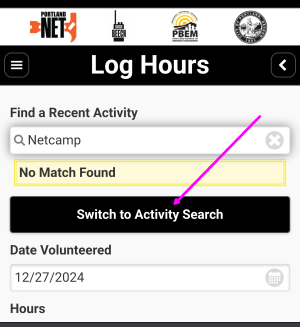
The MyImpact App 'Log Hours' screen

How do I edit or delete a previous time entry?
You can edit an entry for 24 hours after its start time, regardless of when you enter it. There are technical reasons for this limit that actually make sense, but we won't bore you here. If you need an entry corrected or deleted, simply email the Activity date and correction/deletion instruction to net@portlandoregon.gov
How do I get certifications added to my MIP profile?
- Log in to MIP.
- Select My Profile.
- Select Additional Info.
- Next to the appropriate field, choose the Select button and upload your PDF file.
- You're done! PBEM reviews and accepts certificate uploads in batches. When that happens, your new certificate(s) will automatically be noted in your profile page. We will not notify you, because none of us want more silly, transactional emails, do we?
Please note that for FEMA trainings, an Unofficial Transcript cannot be accepted. The reason is that the State requires actual certificates for prerequisite trainings in order to enroll in more advanced classes.
If you have additional relevant certifications that are not listed, such as advanced ICS or a medical license, email them to net@portlandoregon.gov. Note that PBEM only tracks certifications that are related to a deployable NET role, or are prerequisite for additional advanced training. For example, naloxone training is not tracked, while CPR/AED is.
How do I upload a new ID photo?
See ID Photos.
How do I change or add my VSF specialties?
- Log in to MIP.
- Select My Profile.
- Select Qualifications.
- Select your desired VSF: Primary and VSF: Secondary fields. Scroll to the bottom and Save.
- PBEM reviews submitted requests in batches periodically, and approves them if you have any required certifications or training. In other words, a person cannot select 11.04.Food Unit Lead if they have not uploaded a current Food Handler's Card. To upload certifications, see How do I get certifications added to my profile?
- New/updated ID cards are issued only when your current card expires, with the exception of Team Leader elections. This helps constrain program expenses.
Print card
Qualifications & VSFs
This section is accurate but incomplete, and will be integrated into the Volunteer Support Functions Introduction and Directory.
Qualifications are directly related to the 16 Volunteer Support Functions (VSFs). VSFs are categories into which NETs' skills and training are classified for the purpose of identifying cadres of volunteers suitable for specific deployments. In addition to streamlining emergency ops, VSFs also guide the trainings we offer, and support your natural path to skill specialization(s). No one can be an expert at everything!
| VSF | VSF Name | Level | Qualification | Online | In-person | Suggested Training |
|---|---|---|---|---|---|---|
| VSF01 | Transportation | 10 | Traffic Control | • | • | Watch the NET Training Video and participate in a PBEM-initiated down power line deployment, vaccine clinic traffic control, etc. (Do not self deploy to down power lines!) |
| VSF01 | Transportation | 20 | CoP (City of Portland) Certified Driver | • | [Not currently available] Driver background check + two-hour procotorer online training + skid car training | |
| VSF02 | Communications | 10 | Amateur Radio | • | Obtain an FCC Amateur Radio License | |
| VSF02 | Communications | 20 | ARES/RACES | • | Become an active member of MCARES (Multnomah County Amateur Radio Emergency Services) | |
| VSF02 | Communications | 30 | NET ARO Trained | • | • | Complete NET ARO (Amateur Radio Operator) certification |
| VSF03 | Infrastructure & Sanitation | [Pending] | ||||
| VSF04 | Utilities & Fire Suppression | 10 | Wire Down | • | Watch the NET Training Video and deploy for a PBEM-initiated down power line deployment (Do not self deploy to down power lines -- call 911!) | |
| VSF05 | Response Planning | 10 | IS100 | • | FEMA online: Introduction to the Incident Command System - 2 hours | |
| VSF05 | Response Planning | 20 | IS200 | • | FEMA online: Basic Incident Command System for Initial Response - 4 hours | |
| VSF05 | Response Planning | 30 | IS315 | • | FEMA online: CERT and the Incident Command System - 2 hours | |
| VSF05 | Response Planning | 40 | IS700 | • | FEMA online: An Introduction to the National Incident Management System - 3.5 hours | |
| VSF05 | Response Planning | 50 | IS703 | • | FEMA online: National Incident Management System Resource Management - 3.5 hours | |
| VSF05 | Response Planning | 60 | IS800 | • | FEMA online: National Response Framework, An Introduction - 3 hours | |
| VSF05 | Response Planning | 70 | ICS-300 | • | Intermediate Incident Command System for Expanding Incidents - 18 hours/3 days
Available in-person through various sponsoring agencies; not currently offered by PBEM. | |
| VSF05 | Response Planning | 80 | ICS-400 | • | Enhanced Incident Command System - 14-16 hours/2 days
Available in-person through various sponsoring agencies; not currently offered by PBEM. | |
| VSF06 | Mass Care & Shelter | 10 | IS366 | • | • | FEMA online: Planning for the Needs of Children in Disasters - 6 hours
or equivalent |
| VSF06 | Mass Care & Shelter | 20 | Severe Weather Shelter (SWS) Training | • | • | Inline and in-person options are made available periodically by PBEM and Multnomah County. Available options are announced in the weekly NET Bulletin when scheduled. |
| VSF06 | Mass Care & Shelter | 30 | Severe Weather Shelter (SWS) Deployment | • | Deploy at a severe weather shelter.
With additional training, repeated deployments in increasingly responsible roles, and approval of Multnomah County Health staff, volunteers can eventually serve as a PIC (Person in Charge). | |
| VSF07 | Logistics | 10 | Contact Tracing | • | • | [Pending] |
| VSF08 | Medical | 10 | CPR/AED/First Aid certification | • | Certification classes are | |
| VSF08 | Medical | 20 | Helping Persons with Disabilities (PWD) | • | • | Various online and in-person options, announced in the weekly NET Bulletin |
| VSF08 | Medical | 30 | Wilderness First Aid (WFA) | • | 3-day class. Opportunities are announced in the weekly NET Bulletin.
For-fee classes are also available through other certifying organizations. | |
| VSF08 | Medical | 40 | Wilderness First Responder (WFR) | • | 10-day field class. Opportunities are announced in the weekly NET Bulletin.
For-fee classes are also available through other certifying organizations. | |
| VSF08 | Medical | 50 | Medical Professional | • | Provide a copy of, or link to, your Medical License. | |
| VSF08 | Medical - Advanced Bleeding Control | Opportunities are announced in the weekly NET Bulletin.
For-fee classes are also available through other certifying organizations. Also known as Stop the Bleed. | ||||
| VSF08 | Medical - Psyche | 10 | De-escalation Training | • | • | Opportunities are announced in the weekly NET Bulletin. |
| VSF08 | Medical - Psyche | 20 | Mental Health First Aid (MFHA) | • | • | Opportunities are announced in the weekly NET Bulletin.
For-fee classes are also available through other certifying organizations. |
| VSF08 | Medical - Psyche | 30 | Crisis Counseling | Provide a copy of, or link to, your certification | ||
| VSF09 | Search & Rescue | 10 | Basic NET Training (BNT) | • | • | All Active NETs are qualified after completing their Final Field Exercise (FFE) |
| VSF09 | Search & Rescue | 20 | Knots (Basic) | • | • | Opportunities are announced in the weekly NET Bulletin. |
| VSF09 | Search & Rescue | 30 | Knots (Advanced) | • | • | Opportunities are announced in the weekly NET Bulletin.
Other experience may qualify you to pass the skills demonstration test. |
| VSF10 | HAZMAT Awareness | 10 | IS0005 | • | FEMA online: An Introduction to Hazardous Materials - 10 hours | |
| VSF10 | HAZMAT Awareness | 20 | PBEM Training | |||
| VSF10 | HAZMAT Awareness | 30 | HAZWOPER Certification | Not offered by PBEM. Available through various certifying organizations. | ||
| VSF11 | Food & Water | 10 | Food Handler Card | Not offered by PBEM. Available through certifying organizations for approximately $10; see the Oregon Health Authority website. | ||
| VSF12 | Light & Power | [Pending] | ||||
| VSF14 | Public Information | Speakers Bureau | • | • | Opportunities are announced in the weekly NET Bulletin. | |
| VSF15 | Volunteers & Donations | 10 | IS240 | • | FEMA online: Leadership and Influence - 3 hours | |
| VSF15 | Volunteers & Donations | 20 | IS241 | • | FEMA online: Decision Making and Problem Solving - 2 hours | |
| VSF15 | Volunteers & Donations | 30 | IS242 | • | FEMA online: Effective Communication - 8 hours | |
| VSF15 | Volunteers & Donations | 40 | IS244 | • | FEMA online: Developing and Managing Volunteers - 4 hours | |
| VSF15 | Volunteers & Donations | 50 | Team Leader Training | • | • | Opportunities are announced in the weekly NET Bulletin. |
| VSF17 | Animal Response | 10 | Animal Sheltering/Response | • | • | Opportunities are announced in the weekly NET Bulletin. Classes typically require 8 hours. |
| VSF17 | Animal Response | 20 | TTT (Train as a Trainer) | • | • | Opportunities are announced in the weekly NET Bulletin. Classes typically require 3 hours. |
| VSF18 | Business Resilience | [Pending] |