EditingTeamPages: Difference between revisions
Revise Policies section to match new Volunteer Subject Matter Expert page. |
consolidate and slightly simplify guidance for editing team pages |
||
| Line 22: | Line 22: | ||
Wikis are unfortunately not as pretty as WordPress. The emphasis is more on content than style. | Wikis are unfortunately not as pretty as WordPress. The emphasis is more on content than style. | ||
=== Editors === | |||
There are two editors available: | |||
* The visual (WYSIWYG) editor, entered via the <code>Edit</code> and <code>Create</code> buttons. | |||
* The wikitext (markup) editor, entered via the <code>Edit source</code> and <code>Create source</code> buttons. | |||
The visual editor is most useful for new users, but even users comfortable with markup will find it useful for e.g. providing template parameters. You can choose either, and even switch between them in the same editing session. | |||
=== Your First Edit === | === Your First Edit === | ||
| Line 34: | Line 42: | ||
# Click the <code>Save page...</code> button. | # Click the <code>Save page...</code> button. | ||
# Provide a summary of your changes or rationale. For example, "Update school list". | # Provide a summary of your changes or rationale. For example, "Update school list". | ||
== Editing == | == Editing == | ||
=== | === What Goes On A Team Page? === | ||
Your team page could be the single link your team hands out at block parties or when new neighbors move in. | |||
Please consider it a "landing page" that describes aspects of emergency preparedness that are ''unique to your neighborhood''. For example, | |||
* For potential volunteers: | |||
** provide ways to engage with the local team (e.g. team point of contact, public discussion forums) | |||
** describe unique considerations (e.g. "we work closely with this school," "we meet at this location", "90% of Oregon's fuel supply passes through our neighborhood") | |||
** team accomplishments (e.g. "we've deployed at warming shelters", "we provided first aid at this parade") | |||
* For existing team members: | |||
** recognize team positions (e.g. Team Leader, Amateur Radio Operators) | |||
** contain important links (e.g. to a shared team folder, or to the Operations Plan) | |||
Some content belongs elsewhere: | |||
* News: this content often goes stale, and is better shared in team discussion forums. | |||
* Orientation to the NET program: this is best centralized at PBEM, rather than re-written by individual teams. | |||
* Tips for personal preparedness: this is best centralized at PublicAlerts.org, rather than re-written by individual teams. | |||
=== Team Page Editing Checklist === | |||
= | # ✅ Check the link to your Operations Plan, and use the "plan_name" parameter to the <nowiki>{{Team}}</nowiki> template if it doesn't match. (All Ops Plan links are hosted on portland.gov. If yours is out of date, email an updated file to {{EmailLink|net@portlandoregon.gov|name=net@portlandoregon.gov}}.) | ||
# ✅ Add/update neighborhood populations in the <nowiki>{{Neighborhood}}</nowiki> templates. (See [https://www.portland.gov/civic/myneighborhood/neighborhood-profile-maps Neighborhood Demographic Profiles] page.) | |||
# ✅ Add/update BEECN and fire station sites in the <nowiki>{{Neighborhood}}</nowiki> templates. (See [https://pdx.maps.arcgis.com/apps/webappviewer/index.html?id=d3eaa87bf97148a78a5f358207259d72 BEECNs and Fire Stations] map.) | |||
# ✅ Add/update schools in the <nowiki>{{Neighborhood}}</nowiki> templates. | |||
# ✅ Use [[#Link Templates]] for pretty little icons. | |||
# ✅ Read the [[#Policies]] section below. | |||
=== Can I Upload Photos Or Team Documents? === | |||
For most files, please upload them separately and link to them from your team pages. | |||
Where to host different types of files: | |||
{| class="wikitable" | {| class="wikitable" | ||
! | !file type | ||
! | !where to host it | ||
|- | |||
|small inline images (e.g. team members in action) | |||
|team page | |||
|- | |||
|small inline neighborhood map | |||
|team page | |||
|- | |||
|Photo albums (e.g. team exercises) | |||
|send an email to {{EmailLink|addr=net@portlandoregon.gov|name=net@portlandoregon.gov}} for an upload link | |||
|- | |||
|Operations plans | |||
|[https://www.portland.gov/pbem/neighborhood-emergency-teams/crtopsplans NET Team Operations Plans] (email to {{EmailLink|addr=net@portlandoregon.gov|name=net@portlandoregon.gov}}) | |||
|- | |||
|Meeting minutes | |||
|3rd-party file hosting (e.g. Google Drive) | |||
|- | |- | ||
| | |Internal team documents (e.g. spreadsheets, planning documents) | ||
| | |3rd-party file hosting (e.g. Google Drive) | ||
|- | |- | ||
| | |Outreach materials | ||
| | |3rd-party file hosting (e.g. Google Drive) | ||
| | |} | ||
=== Link Templates === | |||
For example: | |||
{| class="wikitable" | |||
!Template | |||
!Displays as | |||
|- | |- | ||
|<nowiki>{{EmailLink|net@portlandoregon.gov}}</nowiki> | |<nowiki>{{EmailLink|net@portlandoregon.gov}}</nowiki> | ||
|{{EmailLink| | |{{EmailLink|net@portlandoregon.gov}} | ||
|- | |- | ||
|<nowiki>{{FacebookLink|groups/portlandprepares|name=PortlandPrepares}}</nowiki> | |<nowiki>{{FacebookLink|groups/portlandprepares|name=PortlandPrepares}}</nowiki> | ||
|{{FacebookLink|groups/portlandprepares|name=PortlandPrepares}} | |{{FacebookLink|groups/portlandprepares|name=PortlandPrepares}} | ||
|} | |} | ||
=== What | Click on each template in the list below to understand how to use it: | ||
* [[Template:EmailLink]] | |||
* [[Template:GoogleDocLink]] | |||
* [[Template:FacebookLink]] | |||
* [[Template:GroupsLink]] | |||
* [[Template:InstagramLink]] | |||
* [[Template:SignalLink]] | |||
=== What Is Missing? === | |||
The current wishlist: | The current wishlist: | ||
* Add an extension to embed team calendars. | * Add an extension to embed team calendars. | ||
* Add an extension for GIS integration, which would allow us to easily embed live maps. | * Add an extension for GIS integration, which would allow us to easily embed live maps. | ||
=== How to get help === | === How to get help === | ||
| Line 137: | Line 154: | ||
Your contributions to this wiki are released under the Creative Commons Attribution-Share Alike license. | Your contributions to this wiki are released under the Creative Commons Attribution-Share Alike license. | ||
==== Can other NET members edit my team's page? ==== | ==== Can other NET members edit my team's page? ==== | ||
Revision as of 12:10, 23 May 2025
Purpose
This page provides guidance to people editing the neighborhood team pages, which are listed on the Teams page.
Accounts
Who can have an account?
Team Leaders, and optionally a team member they designate.
How do I get an account?
Send an email to  net@portlandoregon.gov.
Moderation
Your initial changes will be reviewed by a moderator. That means pending edits will be invisible.
As you get the hang of it, future edits will take place immediately.
Getting Started
Wiki (not WordPress)
This is a wiki, which is a collaboratively edited website. Each edit to a page is recorded as a separate change, resulting in a history of what the page looked like in the past and which user made which changes to it. Wikipedia is the most famous example of a wiki, but there are important differences here, explained below.
Wikis are unfortunately not as pretty as WordPress. The emphasis is more on content than style.
Editors
There are two editors available:
- The visual (WYSIWYG) editor, entered via the
EditandCreatebuttons. - The wikitext (markup) editor, entered via the
Edit sourceandCreate sourcebuttons.
The visual editor is most useful for new users, but even users comfortable with markup will find it useful for e.g. providing template parameters. You can choose either, and even switch between them in the same editing session.
Your First Edit
- Log in with your account.
- Click
Editon your team page. - Update the schools listed for your neighborhood:
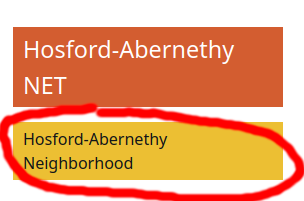
Double-click the yellow "Neighborhood" box on the right side of the page. 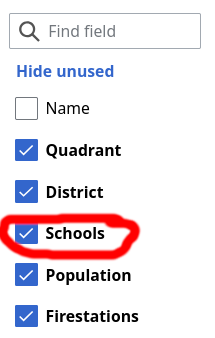
Check the "Schools" checkbox on the left side of the dialog. 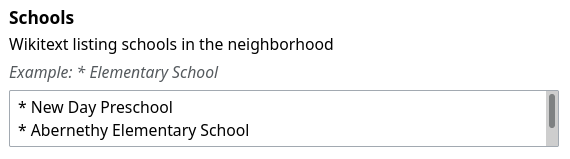
Find the "Schools" content section in the center of the dialog. Add schools you know of, one per line, with an asterisk ("*") at the beginning of the line. 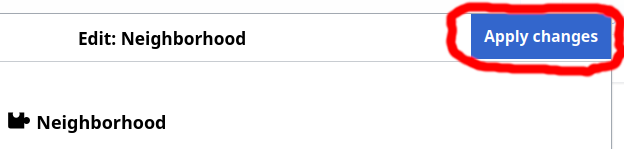
Click the Apply Changesbutton in the top right corner.
- Click the
Save page...button. - Provide a summary of your changes or rationale. For example, "Update school list".


Editing
What Goes On A Team Page?
Your team page could be the single link your team hands out at block parties or when new neighbors move in.
Please consider it a "landing page" that describes aspects of emergency preparedness that are unique to your neighborhood. For example,
- For potential volunteers:
- provide ways to engage with the local team (e.g. team point of contact, public discussion forums)
- describe unique considerations (e.g. "we work closely with this school," "we meet at this location", "90% of Oregon's fuel supply passes through our neighborhood")
- team accomplishments (e.g. "we've deployed at warming shelters", "we provided first aid at this parade")
- For existing team members:
- recognize team positions (e.g. Team Leader, Amateur Radio Operators)
- contain important links (e.g. to a shared team folder, or to the Operations Plan)
Some content belongs elsewhere:
- News: this content often goes stale, and is better shared in team discussion forums.
- Orientation to the NET program: this is best centralized at PBEM, rather than re-written by individual teams.
- Tips for personal preparedness: this is best centralized at PublicAlerts.org, rather than re-written by individual teams.
Team Page Editing Checklist
- ✅ Check the link to your Operations Plan, and use the "plan_name" parameter to the {{Team}} template if it doesn't match. (All Ops Plan links are hosted on portland.gov. If yours is out of date, email an updated file to net@portlandoregon.gov.)
- ✅ Add/update neighborhood populations in the {{Neighborhood}} templates. (See Neighborhood Demographic Profiles page.)
- ✅ Add/update BEECN and fire station sites in the {{Neighborhood}} templates. (See BEECNs and Fire Stations map.)
- ✅ Add/update schools in the {{Neighborhood}} templates.
- ✅ Use #Link Templates for pretty little icons.
- ✅ Read the #Policies section below.
Can I Upload Photos Or Team Documents?
For most files, please upload them separately and link to them from your team pages.
Where to host different types of files:
| file type | where to host it |
|---|---|
| small inline images (e.g. team members in action) | team page |
| small inline neighborhood map | team page |
| Photo albums (e.g. team exercises) | send an email to net@portlandoregon.gov for an upload link
|
| Operations plans | NET Team Operations Plans (email to net@portlandoregon.gov)
|
| Meeting minutes | 3rd-party file hosting (e.g. Google Drive) |
| Internal team documents (e.g. spreadsheets, planning documents) | 3rd-party file hosting (e.g. Google Drive) |
| Outreach materials | 3rd-party file hosting (e.g. Google Drive) |
Link Templates
For example:
| Template | Displays as |
|---|---|
| {{EmailLink|net@portlandoregon.gov}} | Email
|
| {{FacebookLink|groups/portlandprepares|name=PortlandPrepares}} |  PortlandPrepares PortlandPrepares
|
Click on each template in the list below to understand how to use it:
- Template:EmailLink
- Template:GoogleDocLink
- Template:FacebookLink
- Template:GroupsLink
- Template:InstagramLink
- Template:SignalLink
What Is Missing?
The current wishlist:
- Add an extension to embed team calendars.
- Add an extension for GIS integration, which would allow us to easily embed live maps.
How to get help
- Start at https://mediawiki.org. Keep in mind that advanced MediaWiki features may require extensions that are not installed here.
- To reach the administration team of this site, send an email to net@portlandoregon.gov.
Policies
What role do city employees have here?
They are the content moderators for the entire site to ensure that it meets the standards required as a City of Portland website.
What pages can I edit?
Volunteer Subject Matter Experts may edit the pages within their areas of expertise.
In addition, "It is not required that a volunteer be a [Subject Matter Expert] in order to write Wiki content; however, depending on the content, a SME may be responsible for reviewing and approving it.
Allowed content
All contributions must adhere to the PBEM Volunteer Code of Conduct. Especially relevant is "I will treat fellow volunteers, Team Leaders, City employees, and individuals I serve with dignity, respect, and courtesy. I will take steps to quell profane, abusive, demeaning, belittling, or harassing interactions or communications with others." Since it is included in the previous document, contributions must also follow the City of Portland's Code of Ethics.
Team page content must also be relevant (i.e. within the scope of the team). For example, a team page is not an appropriate forum for evangelizing adoption of a new solar-powered gurney with built-in Internet hotspot via satellite. While very cool, it is not within the scope of any individual team.
Copyright
Copyright law can be nuanced, but as a general rule, please do not add text which you didn't write or files you didn't create.
Your contributions to this wiki are released under the Creative Commons Attribution-Share Alike license.
Can other NET members edit my team's page?
Yes, and these contributions should be welcomed.
- Watch your team's page so you receive notifications when it's changed.
- If someone else's change needs improvement, improve it.
- If there is a disagreement that can't be resolved, send an email to net@portlandoregon.gov for help.