EditingTeamPages: Difference between revisions
add table to illustrate link template output |
update based on PBEM review |
||
| Line 103: | Line 103: | ||
# Watch your team's page so you receive notifications when it's changed. | # Watch your team's page so you receive notifications when it's changed. | ||
# If someone else's change needs improvement, improve it. | # If someone else's change needs improvement, improve it. | ||
# If there is a disagreement that can't be resolved, send an email to {{EmailLink|addr=net@portland.gov|name=net@portland.gov}} for help. | # If there is a disagreement that can't be resolved, send an email to {{EmailLink|addr=net@portland.gov|name=net@portland.gov}} for help. | ||
=== Can I edit any page on the wiki? === | |||
Subject matter experts are responsible for other pages. Team editors should limit their changes to team pages. | |||
=== Can I upload photos or team documents? === | === Can I upload photos or team documents? === | ||
For most files, please upload them separately and link to them from your team pages. | |||
Where to host different types of files: | |||
{| class="wikitable" | |||
!file type | |||
!where to host it | |||
|- | |||
|small inline images (e.g. team members in action) | |||
|team page | |||
|- | |||
|small neighborhood map | |||
|team page | |||
|- | |||
|Photo albums (e.g. team exercises) | |||
|send an email to {{EmailLink|addr=net@portland.gov|name=net@portland.gov}} for an upload link | |||
|- | |||
|Operations plans | |||
|[https://www.portland.gov/pbem/neighborhood-emergency-teams/crtopsplans NET Team Operations Plans] (email to {{EmailLink|addr=net@portland.gov|name=net@portland.gov}}) | |||
|- | |||
|Meeting minutes | |||
|3rd-party file hosting (e.g. Google Drive) | |||
|- | |||
|Internal team documents (e.g. spreadsheets, planning documents) | |||
|3rd-party file hosting (e.g. Google Drive) | |||
|- | |||
|Outreach materials | |||
|3rd-party file hosting (e.g. Google Drive) | |||
|} | |||
=== Copyright === | === Copyright === | ||
| Line 128: | Line 145: | ||
=== What role do city employees have here? === | === What role do city employees have here? === | ||
They are the exclusive editors of the site content they have created. | They are the content moderators for the entire site, and exclusive editors of the site content they have created. | ||
Revision as of 15:51, 8 May 2025
Accounts
Who can have an account?
Team Leaders, and optionally a team member they designate.
How do I get an account?
Send an email to  net@portland.gov.
Moderation
Your initial changes will be reviewed by a moderator. That means pending edits will be invisible.
As you get the hang of it, future edits will take place immediately.
Getting Started
WikiNET is a wiki, which is a collaboratively edited website. Each edit to a page is recorded as a separate change, resulting in a history of what the page looked like in the past and which user made which changes to it.
(Wikipedia is the most famous example of a wiki, but there are important differences here, explained below.)
Your First Edit
- Log in with your account.
- Click
Editon your team page. - Update the schools listed for your neighborhood:
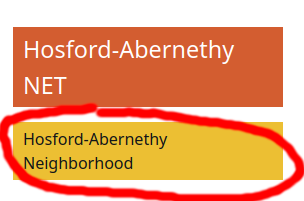
Double-click the yellow "Neighborhood" box on the right side of the page. 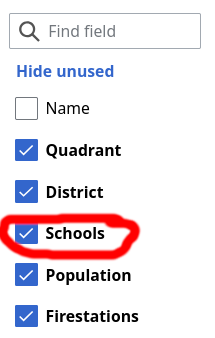
Check the "Schools" checkbox on the left side of the dialog. 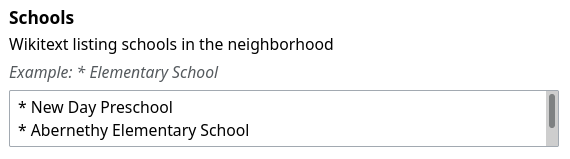
Find the "Schools" content section in the center of the dialog. Add schools you know of, one per line, with an asterisk ("*") at the beginning of the line. 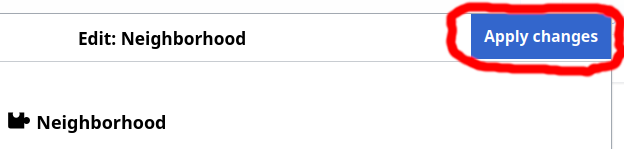
Click the Apply Changesbutton in the top right corner.
- Click the
Save page...button. - Provide a summary of your changes or rationale. For example, "Update school list".


Your Second Edit
Look up the population for your neighborhood(s) in portlandmaps.com. Update the Neighborhood template(s) as above.
Your Third Edit
Look up stations on the fire station map and update your neighborhood(s).
Editing
Editors
There are two editors available:
- The visual (WYSIWYG) editor, entered via the
EditandCreatebuttons. - The wikitext (markup) editor, entered via the
Edit sourceandCreate sourcebuttons.
The visual editor is most useful for new users, but even users comfortable with markup will find its guidance useful for e.g. providing template parameters. You can choose either, and even switch between them in the same editing session.
Templates
There are a number of templates useful for NET Team pages.
Every team page should use these templates. They provide a consistent sidebar with basic stats, and group your pages into categories for navigation:
Other templates do things like make links pretty. Please use them for more appealing team pages:
- Template:EmailLink
- Template:GoogleDocLink
- Template:FacebookLink
- Template:GroupsLink
- Template:InstagramLink
- Template:SignalLink
Here is why it is useful:
| Unformatted text | Displays as | |
|---|---|---|
| net@portland.gov | net@portland.gov | |
| [mailto:net@portland.gov net@portland.gov] | net@portland.gov | |
| template: | {{EmailLink|net@portland.gov}} | Email
|
| [https://www.facebook.com/groups/portlandprepares PortlandPrepares] | PortlandPrepares | |
| template: | {{FacebookLink|groups/portlandprepares|name=PortlandPrepares}} |  PortlandPrepares PortlandPrepares
|
How to get help
- Start at https://mediawiki.org. Keep in mind that advanced MediaWiki features may require extensions that are not installed here.
- To reach administration team of this site, send an email to net@portland.gov.
Policies
Can other NET members edit my team's page?
Yes, and these contributions should be welcomed.
- Watch your team's page so you receive notifications when it's changed.
- If someone else's change needs improvement, improve it.
- If there is a disagreement that can't be resolved, send an email to net@portland.gov for help.
Can I edit any page on the wiki?
Subject matter experts are responsible for other pages. Team editors should limit their changes to team pages.
Can I upload photos or team documents?
For most files, please upload them separately and link to them from your team pages.
Where to host different types of files:
| file type | where to host it |
|---|---|
| small inline images (e.g. team members in action) | team page |
| small neighborhood map | team page |
| Photo albums (e.g. team exercises) | send an email to net@portland.gov for an upload link
|
| Operations plans | NET Team Operations Plans (email to net@portland.gov)
|
| Meeting minutes | 3rd-party file hosting (e.g. Google Drive) |
| Internal team documents (e.g. spreadsheets, planning documents) | 3rd-party file hosting (e.g. Google Drive) |
| Outreach materials | 3rd-party file hosting (e.g. Google Drive) |
Copyright
Copyright law can be nuanced, but as a general rule, please do not add text which you didn't write or files you didn't create.
Your contributions to this wiki are released under the Creative Commons Attribution-Share Alike license.
What role do city employees have here?
They are the content moderators for the entire site, and exclusive editors of the site content they have created.